

A visitor searches your site for a product manual, an ingredient, or a specific article. The results page returns nothing, shows an obsolete PDF, or ranks a category page above the answer. The visitor tries one more query, then leaves for Google, a competitor, or nowhere at all.
That failure rarely starts with the search box. It starts with incomplete indexing, weak document fields, unclear ranking rules, missing query analytics, or a front end that makes useful results difficult to scan. A custom search for website turns those pieces into a product: one that helps users find evidence, gives content teams a map of demand, and gives engineers measurable signals to improve retrieval.
Search is already a default behavior on the open web. Industry statistics cited by SEO Works put Google above 5 trillion searches per year, around 190,000 searches per second, and estimate that search engines account for about 68% of website traffic. The same source cites research that 93% of online interactions begin with a search. These figures describe web search, not internal site search, but they explain why visitors expect a search-first path inside your property too. SEO Works' search statistics overview provides that broader context.
The practical approach is a feedback loop: index the right content, retrieve it with a deliberate blend of signals, wire the interface without slowing the page, and measure what users do after the query.
Table of Contents
- Why Custom Site Search Matters More Than the Search Box
- Choosing a Build Path Hosted, Self-Hosted, and LLM-Augmented
- Indexing the Right Content and Keeping It Fresh
- Tuning Relevance With Keywords, Semantics, and Rules
- Wiring the Front-End Without Slowing the Page
- Measuring Search With Queries, Clicks, and Conversions
- A Practical Rollout Plan and What to Ship First
Why Custom Site Search Matters More Than the Search Box
A search user has already expressed intent. They may know the product family, document title, error code, or topic they need. If your system responds with irrelevant pages, the problem isn't merely poor navigation. It has interrupted a high-intent task.
Built-in CMS search often treats every page as equivalent. It may index navigation labels, boilerplate, tag archives, and old versions alongside the actual article or product record. It may match a word in a footer more strongly than a phrase in the title. On a commerce site, it can return a broad category when the query names a specific model. On a documentation site, it can surface an introduction while hiding the troubleshooting step.
Practical rule: Treat every query as both a retrieval request and a product signal.
The first signal is user behavior. Watch for zero-result searches, rapid reformulations, clicks on low-ranked results, search abandonment, and visits that return immediately to the results page. None of these proves a single cause, but together they show where the search experience fails. A zero-result query may indicate a content gap, a synonym gap, an indexing defect, or a typo-handling problem.
The second signal is business impact. Search-assisted conversions and revenue matter more than raw query volume. A rising number of searches can mean stronger demand, but it can also mean users are searching repeatedly because navigation and ranking aren't helping.
Make the search layer accountable
A useful operating model assigns ownership across four areas:
- Indexing: Content and engineering define which documents, fields, and versions enter the index.
- Relevance: Search owners tune keyword matching, synonyms, boosts, filters, and semantic retrieval.
- Experience: Product and front-end teams make results fast, readable, and useful on mobile.
- Measurement: Analytics connects queries to clicks, dwell, conversions, and content decisions.
BuiltWith reports 1,252,328 websites that are or were Google Custom Search customers, including 144,600 live websites and 1,107,728 historical deployments, in a dataset updated on 2025-11-09. The BuiltWith Google Custom Search dataset indicates how durable site search has been across publishers, commerce sites, and enterprise properties.
The right goal isn't “add a search box.” It's help the visitor reach the right destination with the fewest failed attempts, then use the resulting evidence to improve the system.
Choosing a Build Path Hosted, Self-Hosted, and LLM-Augmented
The three practical paths differ less in their ability to return text than in who carries the operational burden.
A hosted search API is usually the quickest route from an empty index to a production result page. Algolia, Typesense Cloud, and Elasticsearch on Elastic Cloud provide managed infrastructure, dashboards, scaling options, and established ranking features. You trade some control and accept vendor-specific pricing and APIs in exchange for less cluster maintenance.
Self-hosted engines such as Meilisearch, Typesense, OpenSearch, and Vespa give your team more control over analyzers, storage, deployment location, and custom ranking. They can fit teams that need data inside a VPC or want to modify retrieval significantly. The cost is operational: capacity planning, backups, upgrades, replication, monitoring, and reindexing become your responsibility.
LLM-augmented retrieval adds embeddings, query interpretation, or a reranker to a conventional search layer. It can help when users ask long, natural-language questions and the relevant answer uses different vocabulary from the query. It's usually unnecessary for a structured product catalog where exact attributes, filters, availability, and deterministic ordering matter more.
| Dimension | Hosted API | Self-Hosted OSS | LLM-Augmented |
|---|---|---|---|
| Time to first result | Fastest for most teams | Depends on deployment and schema work | Requires a base index plus model integration |
| Operational control | Provider manages infrastructure | Your team manages the full stack | Depends on the underlying engine and model services |
| Freshness | Webhooks and managed pipelines are usually straightforward | Queues, workers, and validation are yours to build | Embeddings must be regenerated when indexed content changes |
| Ranking flexibility | Strong configuration, bounded by the platform | Broad analyzer and ranking control | Adds semantic or reranking signals, with more tuning complexity |
| Best fit | Teams prioritizing delivery speed | Teams prioritizing control or private deployment | Long-tail questions, documents, and forums |
| Main risk | Vendor coupling and recurring usage costs | Maintenance and silent indexing failures | Latency, explainability, and unnecessary complexity |
The Openbase model documentation can be relevant when your retrieval layer calls language models for query rewriting, classification, or answer generation. Keep that integration narrow. A model should improve a known failure mode, not replace basic indexing and ranking discipline.
Decide before implementation
Ask four questions:
- How quickly does content change? A documentation portal with frequent releases needs reliable incremental updates. A mostly static marketing site can tolerate a simpler pipeline.
- Who operates search after launch? If editors need to manage synonyms and boosts, an admin interface may matter more than raw engine flexibility.
- Which queries fail today? Export actual logs before selecting semantic retrieval. Domain-specific terms often respond better to a curated synonym set than to a larger model.
- What must be explainable? Support agents and regulated teams may need to understand why a result appeared. A keyword match with visible fields is easier to audit than an opaque semantic score.
Start with the least complicated path that can capture your data and expose useful analytics. Add semantic components only after query evidence shows where lexical retrieval is insufficient.
Indexing the Right Content and Keeping It Fresh
Index quality is a data pipeline problem before it's a ranking problem. A crawler can successfully fetch thousands of URLs and still produce a poor index if it includes staging paths, internal result pages, tag archives, duplicate pagination, and thin templates.
Create inclusion rules for each content type. Articles may need title, heading, summary, body, author, date, and tags. Products need model identifiers, attributes, availability fields, and structured specifications. Documentation needs version, product, release, and heading hierarchy. FAQs need the question and answer as separate searchable fields.
Create exclusions just as deliberately:
- Internal search pages: They create recursive result noise.
- Cart, account, and admin routes: These aren't discovery documents.
- Staging and preview paths: They expose unstable or duplicate content.
- Thin tag and archive pages: They often outrank the underlying resource.
- Obsolete versions: Keep them only when users genuinely need historical evidence.
Index the rendered truth
JavaScript-heavy sites create a common mismatch. The crawler receives a shell, while the browser later renders the title, body, canonical URL, and structured metadata. If you index the raw response, your search engine may never see the content users read.
Use server-rendered output where possible. Otherwise, add a controlled rendering step or ingest directly from the CMS, product database, documentation repository, or publishing API. Store the canonical URL and a stable source identifier so updates replace existing records instead of creating duplicates.
For long documents, chunk content around meaningful headings rather than arbitrary page boundaries. Moderate chunks with some overlap can improve passage retrieval, but the exact size should follow your document structure and model context. Keep the parent document available so a useful passage can lead to the complete article, guide, or product page.
Build freshness checks into operations
Every indexed record should carry a source timestamp, index timestamp, content type, and version where applicable. An incremental queue can process publishes, updates, unpublishes, and deletes. A periodic full rebuild remains useful for detecting drift, even when incremental updates appear healthy.
A nightly validation job should check:
- Whether canonical documents remain searchable.
- Whether deleted or unpublished records disappeared.
- Whether indexed counts by content type are plausible.
- Whether recent publishes arrive within the expected freshness window.
- Whether sample records contain required fields.
A successful crawl is not proof of a healthy index. Validate what users can retrieve, not only what the crawler fetched.
The verified guidance on custom search engine failure modes emphasizes coverage, freshness, explicit inclusion rules, and validation alongside relevance measurement. That ordering matters. Tuning a ranking formula can't rescue documents that never entered the index.
Tuning Relevance With Keywords, Semantics, and Rules
Start with a lexical baseline. BM25 or an equivalent keyword scorer gives you explainable behavior, strong handling for product names and error codes, and a reference point for every later experiment. If the baseline fails, identify why before adding a model.
A practical relevance stack often has four layers:
- Lexical retrieval finds exact and related terms across selected fields.
- Semantic retrieval finds conceptually similar content when vocabulary differs.
- Business rules boost, bury, filter, or constrain results by content type and state.
- Query understanding handles synonyms, spelling variants, intent, and ambiguous short inputs.
Avoid treating semantic search as a replacement for keyword matching. A user searching for a precise part number expects that identifier to dominate a broad semantically similar article. Conversely, a question such as “how do I restore access after changing phones?” may need semantic matching across several differently worded support documents.
Use signals you can explain
Field weighting should reflect the way users recognize an answer. A title match usually deserves more influence than a footer match. Headings and structured attributes can carry more weight than generic body text. Recency may matter for release notes, but it can damage evergreen documentation if applied globally.
| Signal | Weight | Notes |
|---|---|---|
| Title or exact identifier | High | Protects named products, models, and document titles |
| H1 and section headings | High | Captures the language users scan first |
| Tags and structured attributes | Medium to high | Useful for controlled vocabulary and facets |
| Body text | Medium | Provides breadth without overwhelming precise matches |
| Recency | Context-dependent | Strong for news and releases, weak for evergreen guides |
| Archive or thin-page status | Negative | Prevents low-value records from dominating |
Use a synonym file built from real zero-result and reformulated queries. “SSO” and “single sign-on” might be equivalent in one product area, while “renewal” and “upgrade” may represent different commercial intents. Domain owners should approve these mappings because an incorrect synonym can contaminate every result.
Short queries need special care. A single term can refer to a product, a feature, a category, or an error. Autocomplete logs reveal common interpretations, while title-first matching and disambiguation prompts can keep the engine from guessing by default. When two meanings are both common, show useful facets or ask a lightweight clarification question.
Evaluate changes against fixed evidence
Create a frozen test set from historical queries. Each query should have hand-labeled relevance grades for the top candidate documents. A spreadsheet is enough at first. The site-search relevance evaluation methodology recommends exporting top terms, mapping intent, scoring results, and using query logs and outcomes to guide iteration.
Use precision, recall, and nDCG alongside online signals. CTR can rise because one result is easy to click while other relevant documents remain hidden. A/B tests and position-aware logs help separate genuine retrieval improvement from presentation effects.
Change one ranking family at a time, keep the query set stable, and preserve a fast rollback path.
The broader search behavior literature also highlights query reformulation and implicit preferences as central parts of how people search. The research on search behavior and preference signals supports designing for the second query, not only the first. Log reformulations, record result positions, and inspect what users do after an unsuccessful attempt.
Wiring the Front-End Without Slowing the Page
The search interface should feel immediate without becoming part of the page's critical rendering burden. Load the heavier search component after first paint when the page doesn't need it to render. Keep the initial input and button lightweight, then initialize suggestions, filters, and result overlays on demand.
Keystroke behavior needs discipline. Debounce autocomplete requests around 150 to 200 milliseconds if that interval suits your traffic and interaction design, and cancel stale requests with AbortController. Without cancellation, a slower response for “shoe” can arrive after a faster response for “shoes red” and overwrite the newer state.
let controller;

async function search(query) {
  controller?.abort();
  controller = new AbortController();

  const response = await fetch(`/api/search?q=${encodeURIComponent(query)}`, {
    signal: controller.signal
  });

  return response.json();
}
The result component should answer the user's scanning questions quickly:
- What is this result?
- Why did it match?
- Where will it take me?
- Is it an article, product, guide, or support record?
- Is the content current or tied to a particular version?
Render the title, canonical URL or readable path, highlighted snippet, and type badge on the server where possible. Server-side snippets also keep expensive text processing away from the main thread and ensure the result preview reflects the same fields used for ranking.
Design the failure states
“0 results” isn't a useful interface. Offer likely categories, popular searches, recent searches, or a spelling suggestion. For ambiguous queries, show a refinement prompt rather than pretending the first interpretation is certain. For an unavailable service, preserve the query and provide a browse path or fallback to curated navigation.
Use one backend contract across the site overlay, full results page, analytics tools, and future assistants. A JSON endpoint can serve the interactive interface, while a stable REST or GraphQL layer supports dashboards and integrations. Document pagination, filters, ranking metadata, and error behavior before other teams depend on it.
Client-side caching keyed by normalized queries can make repeated searches feel instant. Normalize case and harmless whitespace, but don't erase meaningful punctuation from identifiers. Measure the search component's impact with real-user monitoring, including interaction readiness, request latency, abandonment, and result rendering time.
Teams extending the interface with model-powered features can review available Openbase SDK documentation when they need a compatible integration path for language-model calls. Keep generated answers separate from the authoritative result list until retrieval quality and citation behavior are proven.
Measuring Search With Queries, Clicks, and Conversions
A search system needs an event trail that connects the submitted query to the outcome. Log the query text in a privacy-aware form, the returned result identifiers, click position, destination behavior, and the business action that followed.
Five events cover a useful starting point:
query_submittedresults_returned, including the top result identifiersresult_clicked, including positiondwell_timeon the destinationconversionwhen the session reaches a defined goal
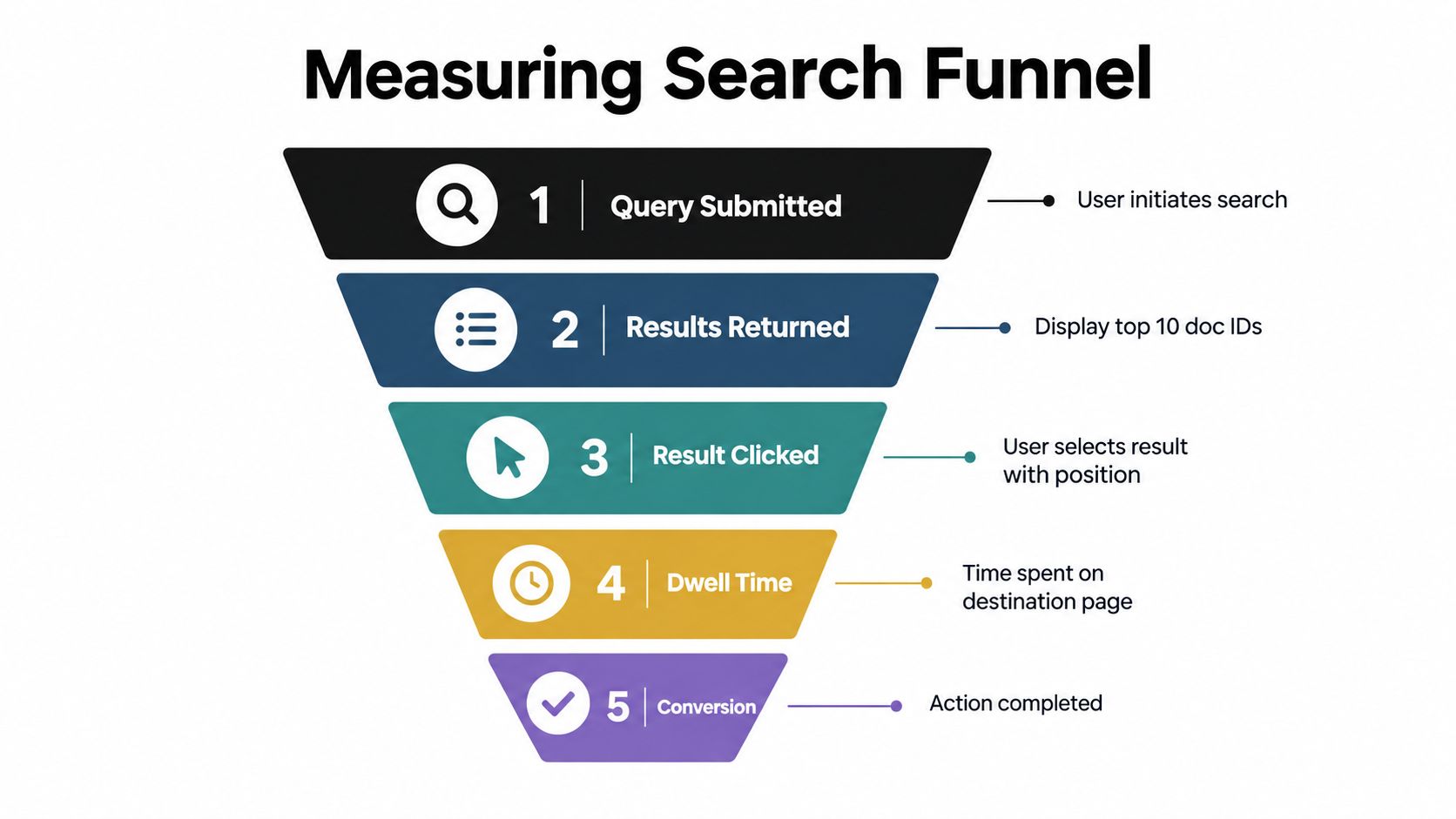
A click alone can mislead. The visitor may click the first result, discover that it doesn't answer the question, and return immediately. Combine click-through at a position, reciprocal rank of clicked results, and zero-result behavior into a simple internal relevance score. Keep the formula stable long enough to compare releases, and inspect the component metrics whenever the aggregate moves.
Turn logs into a work queue
Export the highest-volume queries, the zero-result queries, and the queries with weak relevance scores on a recurring schedule. Assign each issue to one of three queues:
- Content gap: Create or update the document users expect.
- Vocabulary gap: Add an approved synonym, alias, or spelling rule.
- Ranking gap: Adjust fields, boosts, filters, or semantic retrieval.
Compare search-assisted conversions and search-assisted revenue per thousand sessions with search exit behavior on important pages. Query volume by itself doesn't show whether the product helps. A smaller set of successful searches can be healthier than a larger set filled with reformulations.
The retrieval environment is also changing. The Anderson Review reports a 21.7% decline in traditional search traffic relative to the pre-adoption average around week 20 after LLM adoption in its analysis of web behavior. Its report on large language models and zero-click behavior points to a broader expectation of immediate answers. For site search, that supports answer-oriented snippets and direct in-page evidence, but it doesn't remove the need for a trustworthy result list.
The video below offers another visual way to think about the search funnel and its measurement points.
A Practical Rollout Plan and What to Ship First
The first release should create evidence, not attempt to solve every retrieval problem. Index a representative set of important URLs, expose a dependable query endpoint, add a usable search box, and log enough behavior to identify failures. A narrow baseline is more valuable than a complex system that can't explain its results.
Start with a measurable first week
Assign owners before implementation:
- Engineering: Index records, update and delete events, API behavior, front-end wiring, and operational alerts.
- Content: Inclusion rules, required metadata, priority documents, and the first review of zero-result queries.
- Analytics: Event definitions, dashboards, query exports, and business outcome attribution.
- Product: Empty states, filters, result presentation, and acceptance criteria for important query classes.
The first dashboard should show zero-result behavior, average clicked position, reformulations, search exits, and assisted business outcomes. Replay historical queries against candidate ranking configurations before exposing a change to all users. Feature flags make rollback routine rather than dramatic.
| Phase | Scope | Success Metric |
|---|---|---|
| Initial release | Core index, search interface, query and click events, baseline dashboard | Reliable event capture and visible zero-result patterns |
| Early tuning | Field boosts, exclusions, approved synonyms, empty-state improvements | Better relevance on priority queries and fewer dead ends |
| Later expansion | Semantic retrieval, reranking, personalization, assistant surfaces | Improvement on documented long-tail failures without harming precise matches |
Defer personalized boosts, conversational overlays, and broad semantic reranking until the baseline has enough evidence. These features can amplify bad indexing and make debugging harder if introduced before the team understands query intent.
The Openbase quickstart can help teams connect model-powered components when a later experiment needs language-model access. Use that capability for a defined job, such as query classification or answer synthesis over retrieved documents, and keep the conventional search path available when the model is slow, uncertain, or unavailable.
Ship the first loop, review the evidence with engineering, content, analytics, and product, then promote only changes that improve user outcomes without damaging known-good queries.
Openbase provides a single OpenAI-compatible gateway for language-model access, with provider-prefixed models, automatic failover, streaming, tool calling, and usage logs covering tokens, latency, provider, and cost. If you're testing query understanding or answer-oriented retrieval alongside conventional site search, visit Openbase to evaluate that integration path.