
Most advice about custom Slackbot responses starts with trigger phrases and better prompts. That works for canned answers, but it misses the failure that breaks a model-backed bot: spending inference time inside the webhook handler. A clever prompt won't help when Slack decides your app hasn't acknowledged the request and delivers it again.
Treat the reply as a reliability contract instead. The app must accept work safely, process it outside the request, publish without accidental duplicates, and preserve that behavior through permission changes and app migrations. If you only need a fixed answer to a fixed phrase, use a built-in response rather than taking on that operating burden.
Table of Contents
- The Pipeline Slack Will Accept
- How to Wire an LLM Into the Bot
- Formats That Actually Render in Slack
- Retries Rate Limits and Duplicate Posts
- Governed Actions, Migration and Launch
The Pipeline Slack Will Accept
Slack's Events API documentation requires acknowledgment within 3 seconds and describes up to three retries with exponential backoff. Keep the request handler small and acknowledge well inside Slack's window. Model inference belongs outside the webhook.
Verify the request, parse enough of the event to route it, acknowledge promptly, then hand the work to a worker. For interactive buttons and shortcuts, call ack() promptly, then update the original message or send a follow-up through the appropriate response mechanism.
Keep the request path small
Signature verification must use the raw request body, the signing secret, and Slack's request timestamp. The signing secret is not a value to compare directly against an incoming header. Use Bolt's verification support or implement signature verification carefully, including protection against replayed requests.
The pipeline below separates delivery from processing. The handoff between acknowledgment and enqueue needs special care: if the app acknowledges and crashes before saving the event, Slack considers it delivered even though the work is lost.
Custom response pipeline and Slack deadlines
| Stage | What to do | Deadline | If you skip it |
|---|---|---|---|
| Verify | Validate the signature and timestamp using the Slack signing secret | Before accepting work | Forged events can trigger the bot |
| Acknowledge | Return HTTP success, or call ack() for interactions |
Within Slack's 3-second acknowledgment window | Slack retries delivery |
| Enqueue | Persist state and an idempotency key derived from the event or interaction | As part of a durable handoff before acknowledging | Lost jobs or duplicate processing |
| Generate | Call the LLM outside the webhook; optionally publish a working status | Asynchronously, within your worker timeout | Inference blocks delivery acknowledgment |
| Post | Use chat.postMessage, a supported response URL, or a message update |
Through the channel posting limiter | Replies queue up or encounter throttling |
Use a durable inbox or equivalent handoff so acknowledgment doesn't outrun recoverability. Save the accepted event with a unique key, then dispatch its work asynchronously. If the inbox is unavailable, don't acknowledge as though the app has safely accepted responsibility.
Practical rule: Acknowledgment means your app has accepted responsibility for the event. It doesn't mean the answer is ready.
Walk a mention through the system
A user types @helper summarize this thread. The handler verifies the request, records its identity, and acknowledges without fetching thread history or contacting the model.
A worker claims the job, retrieves authorized context, and can post a short working status in the thread. When generation finishes, it replaces that status or follows it with the answer. Store the status message's timestamp so retries don't create fresh progress messages.
Measure each stage separately:
- Acknowledgment latency: Detect slow ingress, cold starts, and verification failures.
- Queue delay: Identify worker shortages before users report missing answers.
- Generation latency: Separate model slowness from your own infrastructure.
- Post latency: Expose Slack write failures and channel congestion.
- Retry and suppression counts: Show whether duplicate delivery is becoming duplicate work.
- Response usefulness: Track whether technically successful replies answer the request.
An end-to-end timer is useful, but it won't identify which stage needs fixing.
How to Wire an LLM Into the Bot
Start with a mention-triggered app that answers in a development channel. Don't add autonomous tools, broad channel access, or elaborate retrieval until that narrow path behaves predictably.
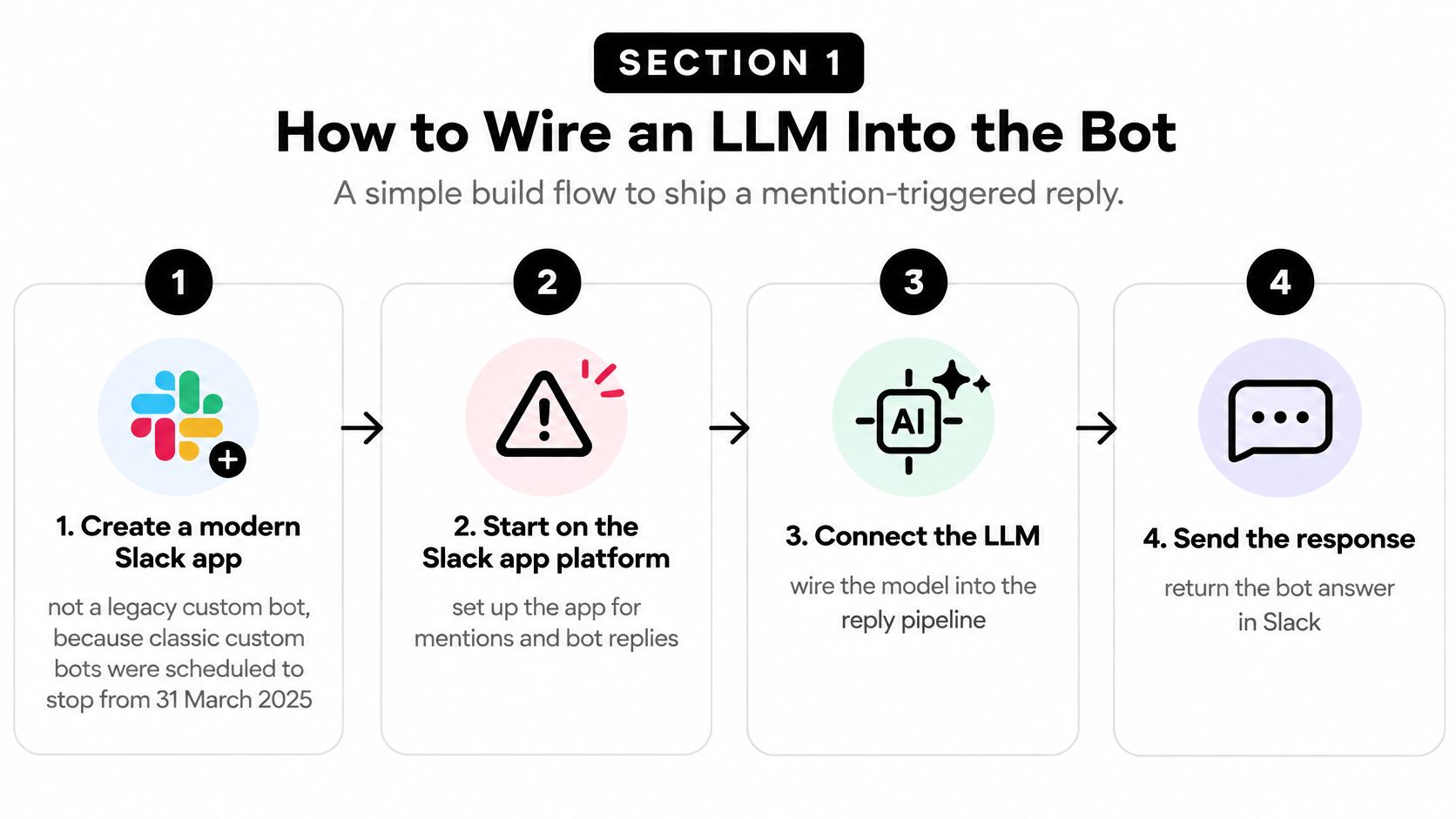
The build has a simple shape, even though the production responsibilities aren't trivial.
Configure the Slack side
Create a modern Slack app. Use the current app model with bot tokens, not a legacy custom bot. Slack's developer changelog scheduled legacy custom bot discontinuation beginning March 31, 2025; an old tutorial's working token isn't evidence that its architecture is a sensible starting point.
Enable Event Subscriptions. Point the request URL at your service, handle Slack's endpoint verification, and subscribe to
app_mention. Addmessage.imonly if direct messages are part of the product. Avoid subscribing to every message merely to discover mentions yourself.Request narrow bot scopes. Use
app_mentions:readto receive mentions andchat:writeto reply. Add conversation-history access only when context retrieval requires it, matching scopes and token types to the conversation and API method. In particular, don't assume that addingchannels:historymakes every thread readable by a bot token; test the actualconversations.repliesaccess path.Install into a development workspace. Keep the bot token and signing secret in a secrets manager, outside the repository. Invite the app into its test channel, and reject events generated by the bot itself so replies don't trigger a loop.
Reinstall or reauthorize when permission changes require it. A manifest change alone doesn't guarantee the installed token has the scopes your worker expects.
Build the worker boundary
Construct a bounded request. Put the mention text in the user input and keep application instructions separate. Fetch only the thread context the task needs, preserve message authorship, and treat pasted instructions inside Slack messages as untrusted content. A thread participant cannot grant the model permission to bypass your application policy.
Connect a compatible chat-completions client. Keep the base URL, API credential, and model identifier in configuration. A unified gateway can reduce integration changes when you switch models, but a common request shape doesn't guarantee identical model behavior. Use the chat-completions quickstart as an integration reference, then test the response fields your worker consumes.
Bound generation and publish in-thread. Set an output-token cap and a generation timeout shorter than the queue's visibility timeout, or renew the lease while work continues. Use the triggering message's thread timestamp, falling back to its own timestamp when it starts the thread. Store the returned Slack message timestamp alongside the job result.
Record the execution outcome. Log the configured model, actual upstream service, token usage, generation timing, time to first token where available, and metered cost. Correlate those records with the Slack event and worker attempt, without dumping raw private conversations into general application logs.
Don't stream by posting every chunk. Accumulate updates and edit the existing response at a controlled cadence, with a final update that marks completion.
A model timeout should produce a recoverable job outcome, not an abandoned webhook or an unexplained success record.
Finish the development test with a mention that produces a fast acknowledgment and an answer beneath the triggering message. Then test an empty thread, inaccessible history, a model timeout, a revoked token, and a repeated delivery. Those cases reveal more about readiness than polishing the greeting.
Formats That Actually Render in Slack
A deploy notification, an incident summary, and an approval request shouldn't share the same presentation. Slack's mrkdwn isn't a browser's Markdown renderer, and generated HTML isn't a dependable way to build a Slack interface.
Choose the surface before asking the model to write the answer. The application should own the message structure; the model should supply bounded content for that structure.
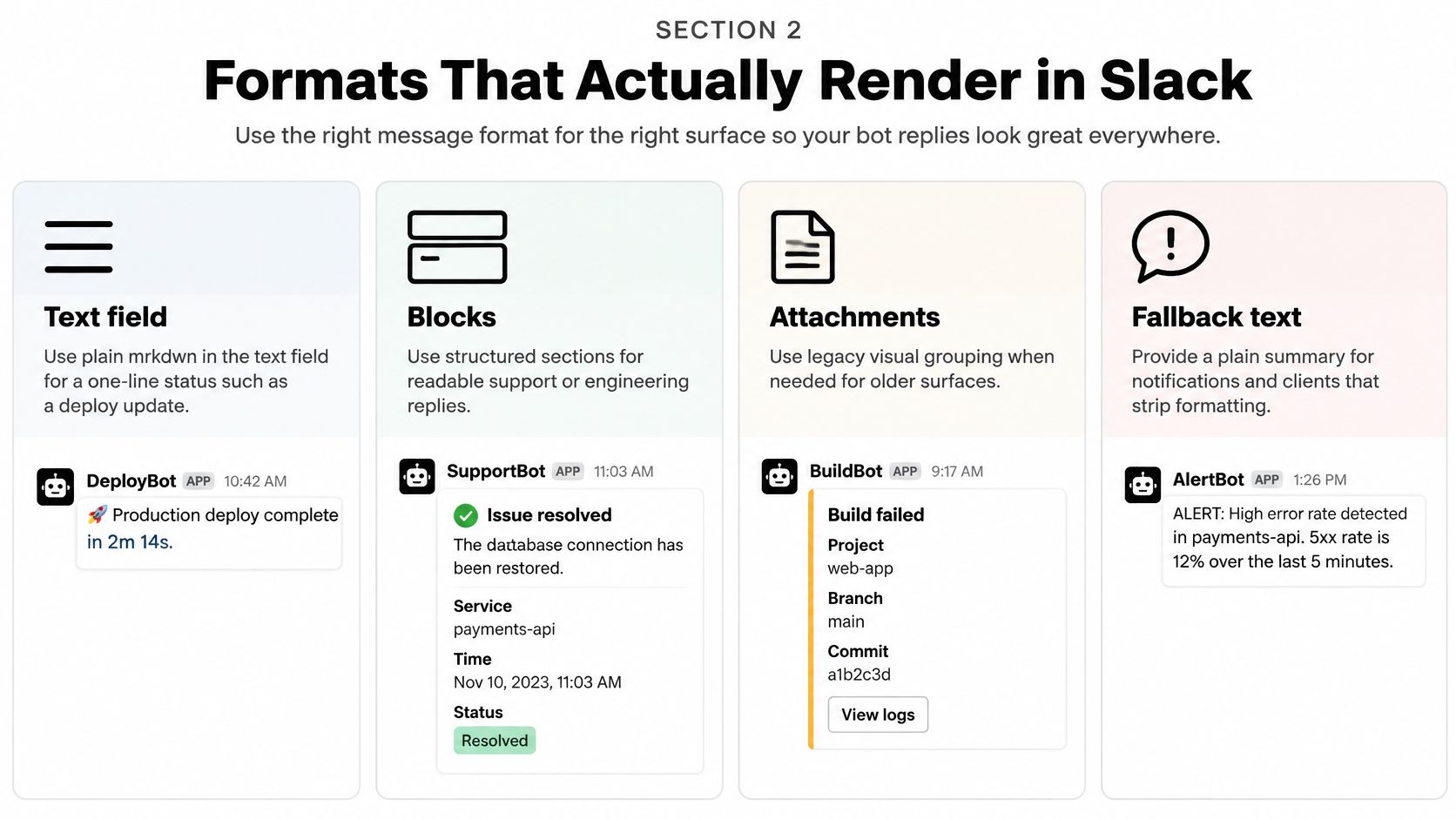
This guide maps common replies to the surfaces that suit them.
Match the reply to its surface
Deploy of api finished on main. Put a status like this in the top-level text field. It doesn't need a header, decorative attachment, or approval control.
The failures started after the configuration change. Put an incident explanation in a section block, with a concise description and uncertainty stated plainly. Split long answers into readable sections or offer a shorter summary rather than trusting the renderer to handle an oversized payload.
Incident summary. Use a header block for this title, with plain_text. Don't put the whole explanation in the header or expect inline formatting there.
Page on-call. Put this control in an actions block. Its click should create an authorization and confirmation flow, not execute whatever command the generated text happens to suggest.
Reply formats and Slack hard limits
| Format | Use it for |
|---|---|
mrkdwn text |
A one-line status and a useful top-level notification summary |
| Section block | The actual answer, validated against the section schema and text limit |
| Header block | A title only, using plain_text |
| Actions block | Confirm, dismiss, open a ticket, or escalate |
| Context block | An attribution footer with model identity and generation timing |
Validate field lengths and block counts against the current Block Kit schema in application code. Don't delegate payload validity to a prompt, and don't rely on oversized text being truncated gracefully rather than rejected.
Keep structure under application control
An incident payload can use this compact JSON sketch:
{"text":"Incident summary: configuration change may explain the failures.","blocks":[{"type":"header","text":{"type":"plain_text","text":"Incident summary"}},{"type":"section","text":{"type":"mrkdwn","text":"Failures began after the configuration change. Check the rollout before attributing the cause."}},{"type":"actions","elements":[{"type":"button","action_id":"request_page_confirmation","text":{"type":"plain_text","text":"Page on-call"},"value":"incident_reference"}]},{"type":"context","elements":[{"type":"mrkdwn","text":"Generated response | Model: configured model | Upstream: recorded service | Generation seconds: measured duration"}]}]}
Populate attribution from execution metadata, not from the model's description of itself. Keep an opaque incident reference in the button value and resolve it server-side; don't embed credentials or trust client-supplied authorization details.
For a visual walkthrough of bot response construction, this video provides another reference.
Don't expect Markdown tables to become Slack grids. Use labeled lines, fields, or separate sections, and escape untrusted text where it could create unwanted mentions or links.
Legacy attachments can support older integrations, but blocks are the clearer default for new structured replies. Keep top-level fallback text meaningful for notifications and accessibility rather than leaving essential information only inside visual controls.
Informational replies belong in readable text and sections. A control that changes a ticket, calendar, or channel belongs behind an explicit action boundary.
Retries Rate Limits and Duplicate Posts
Repeated answers usually indicate a delivery or worker-state problem, not a model that decided to repeat itself. Missing replies can come from the same system: handlers fail, queues grow, writes get throttled, or an event is marked complete before the post succeeds.
Slack's rate-limit documentation describes 30,000 Events API events per workspace, per app, per 60-minute period, with an app_rate_limited event when delivery exceeds that allowance. It also describes temporary subscription disabling when more than 95% of delivery attempts fail in a 60-minute window, exempts apps receiving fewer than 1,000 events per hour from automatic disabling, and advises no more than one posted message per second per channel, while allowing some short bursts.
Diagnose the symptom before retrying
Slack delivery failures and the control that fixes them
| What you see | Slack limit | Control |
|---|---|---|
| Same answer posted repeatedly | Redelivery after a missed acknowledgment | Unique event key; skip completed output |
| Events suddenly stop | Sustained delivery failures can disable subscriptions, subject to Slack's exemption | Fast acknowledgment and failure-rate alerts |
app_rate_limited event |
Workspace-and-app event-delivery allowance | Per-workspace admission control and load shedding |
| Posts vanish or lag in one channel | Channel-level posting throttle | Per-channel limiter and controlled message edits |
| Bad payload loops forever | No useful retry can repair an invalid payload | Dead-letter the job; stop automatic retries |
A worker checking already_posted isn't enough if concurrent workers can both pass the check. Use an atomic state transition or a unique database constraint to claim the response before attempting publication.
Keep separate states for accepted, generating, ready to publish, publishing, posted, and permanently failed. A crashed worker must leave enough information for its replacement to resume without generating a fresh answer unnecessarily.
Retry failures that can recover
Model rate limits, request timeouts, connection failures, and server errors can justify exponential backoff with jitter. Invalid requests and unknown model or endpoint errors need configuration or payload repair, not an endless retry loop. Classify errors by the API involved rather than applying the model client's retry policy indiscriminately to Slack writes.
Use a bounded retry budget across the gateway and worker. If the gateway already attempted upstream recovery, an aggressive outer retry loop can multiply load and spend. The API rate-limit guide is useful when defining that boundary.
- Malformed events: Store a redacted payload, validation error, and correlation ID in a restricted dead-letter destination.
- Overloaded workers: Limit concurrency by workspace so a noisy tenant doesn't consume every worker slot.
- Congested channels: Schedule writes through channel-specific queues rather than letting workers race to post.
- Growing queue age: Use cached answers for fixed intents, omit unnecessary progress chatter, and let expensive summaries complete later.
A working status is still a Slack write. Under congestion, posting one for every queued job can make the backlog worse.
Operational warning: A network timeout after posting leaves an uncertain outcome. Slack may have accepted the message even though your worker never received its timestamp.
Local idempotency doesn't remove that ambiguity. Reconcile uncertain posts where feasible, retain a publishing record, and make the retry policy explicit instead of claiming guaranteed exactly-once delivery.
Before publication, persist a response fingerprint containing workspace, channel, thread, triggering event, and response version. Link it to the resulting message timestamp and retain it long enough to cover your replay and recovery procedures.
Governed Actions, Migration and Launch
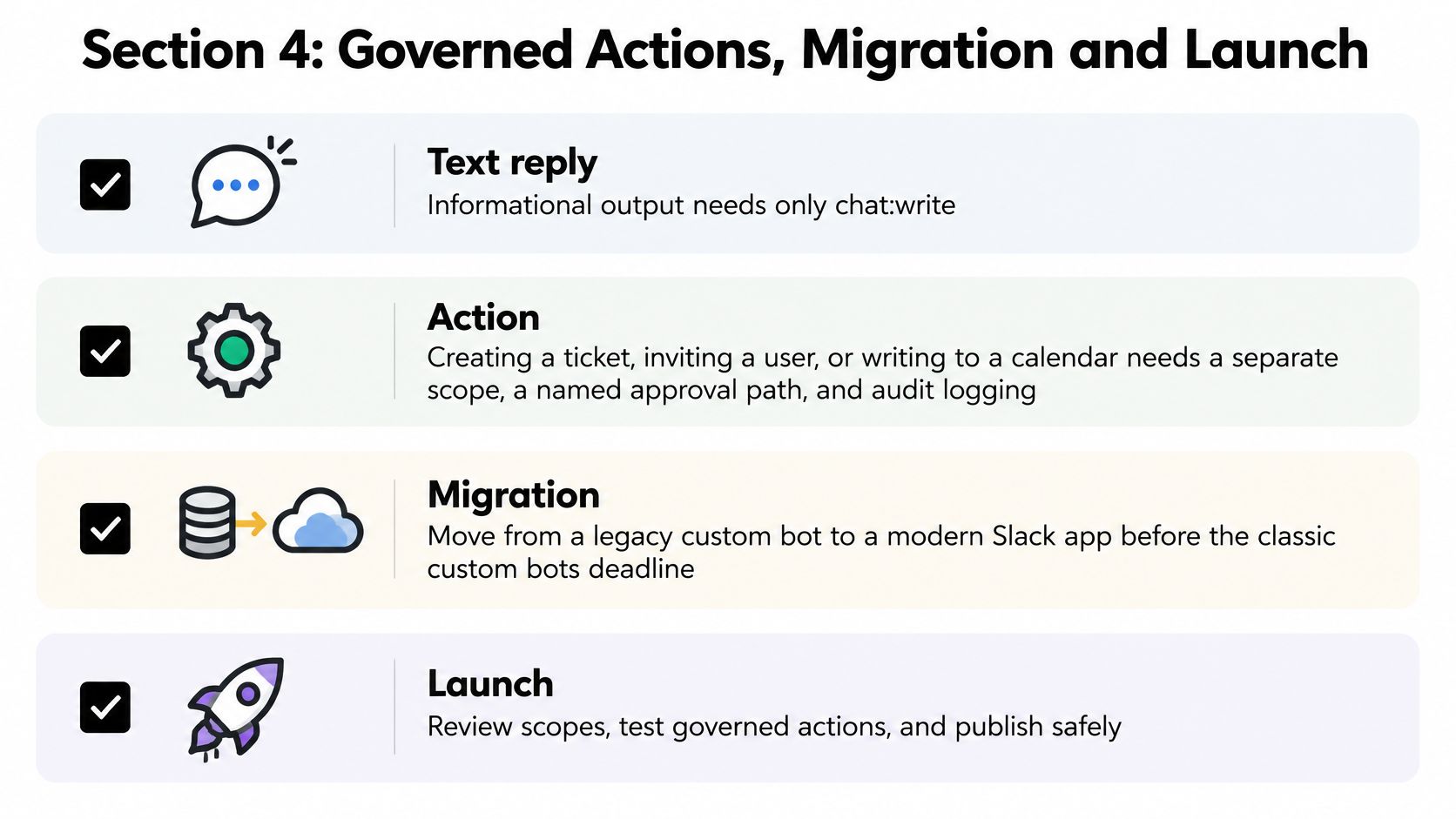
A text reply and an external action carry different risks. An inaccurate summary can mislead someone; an unauthorized calendar change or channel invitation can affect people who never asked the bot to act.
Posting a reply uses chat:write, alongside whatever permissions the app needs to receive its trigger and retrieve context. Creating a ticket or changing a calendar requires separate downstream authorization. A Slack button is an expression of intent, not proof that the person clicking it has permission.
Use this checklist to distinguish a useful assistant from an uncontrolled integration.
Review the action, not just the answer
Before enabling a tool, require the reviewer to identify:
- The actor: Resolve the clicking user to an authorized identity in the destination system.
- The exact change: Display the target, proposed values, and meaningful consequences before confirmation.
- The permission boundary: Check authorization server-side at execution time, not just when rendering the button.
- The recovery path: Define whether the action can be reversed, compensated, or escalated.
- The audit record: Capture user, channel, tool, approved arguments, result, and correlation ID without recording unnecessary secrets.
Redact credentials and unnecessary customer identifiers before constructing prompts. Keep access checks outside the model, and treat retrieved documents and Slack messages as content rather than executable policy.
Give each approved action a durable identity derived from its originating event and action intent. Pass that identity downstream as an idempotency key where supported, and keep your own action ledger where it isn't. A repeated click must not create another ticket unnoticed.
Fallback models must receive the same validated tool schema and face the same server-side restrictions. If compatibility or authorization is uncertain, fail closed and escalate to a human. Don't improvise a replacement action after a permission error or partially completed write.
Use the security review information when evaluating the model gateway's handling of credentials, request content, and operational access. Your review still needs to cover the Slack app, queue, logs, and downstream tools.
Maintain behavior through migration
Version the response contract: recognized intent, expected context, block structure, tool schema, and failure behavior. Replay synthetic events in CI, including repeated deliveries, inaccessible threads, malformed interactions, and revoked permissions.
Keep environment-specific credentials, a rotation procedure, and a rollback to the previous response version. During migration, explicitly assign which installation owns each trigger; otherwise the old app and its replacement can both respond correctly and still produce duplicate user-visible behavior.
Not every automation deserves this machinery. According to SQ Magazine, as reported in Unthread's integration statistics article, Slack Workflow Builder usage reportedly grew by 34% in 2025. Keep deterministic reminders and fixed notifications in workflow tooling when it meets the requirement, and reserve the custom app for work that needs model judgment.
Launch a narrow contract
Choose a development channel and a read-only intent such as thread summarization. Review real replies for correctness, useful uncertainty, unwanted disclosures, and clean thread placement before widening access.
Set alerts for queue age, delivery failures, and app_rate_limited. Add credential-specific spend limits and a named maintenance owner, then test rollback and token revocation before enabling a confirm-gated action.
The next commit should establish reliable acceptance, durable work, and a bounded model call. A longer prompt can follow once the app can keep its promises.
Openbase offers a unified model API with a shared request interface, automatic upstream failover, and per-call usage logging. Visit Openbase to connect your Slack worker to a model endpoint and inspect latency, token usage, and cost while your application retains control of acknowledgments, permissions, and publishing.