
A product team launches on one frontier model because it handles the first version of every feature well enough. Then the workload changes. Short classification requests consume capacity intended for harder work, document inputs expose gaps in text-only processing, latency varies across traffic peaks, and a provider's rate limit becomes an application problem. The bill is harder to predict, too, because every request takes the same route regardless of how much reasoning it needs.
Adding models can address those pressures, but it also introduces new ones: more credentials, more provider behavior to track, and more ways to make a poor routing decision. Multi-model AI is an operating choice, not a free performance upgrade. It works when model selection is tied to workload needs and measured against quality, cost, latency, and reliability.
Table of Contents
- When One Model Stops Being Enough
- What Multi-Model AI Actually Means
- The Core Workloads That Justify Multiple Models
- How Routing and Orchestration Actually Work
- When Routing Helps and When It Quietly Costs You
- A Unified Gateway Versus Direct Multi-Provider Integration
- Choosing the Right Architecture for Your Team
- Governing a Growing Model Portfolio
When One Model Stops Being Enough
A single-model design is easy to ship. The application sends every prompt to one provider, handles one request format, and has one main model to evaluate. That simplicity is valuable while the product has a narrow task and traffic is predictable.
The strain appears as the application grows. A support workflow may need to classify many short messages, reason through a smaller set of complex cases, and extract information from uploaded documents. Using the same frontier model for all three can waste capacity on routine requests while still failing to meet the needs of specialized inputs. Under peak load, provider rate limits or service degradation can also affect every feature at once.
The portfolio follows the workload
The practical response isn't automatically to choose a larger model or add another provider everywhere. It's to identify what each request needs, then decide whether one model can meet that requirement at an acceptable cost and response time. A smaller model may handle straightforward classification; a stronger one can take difficult reasoning tasks; a vision-language model can process images or document pages.
This approach reflects how organizations are using models in practice. In a 2024 survey of AI-infrastructure practitioners, 80.1% of organizations said they used more than one model type, and 52.0% used three or more. The survey also found use of language, multimodal embedding, computer-vision, and vision-language models, rather than a portfolio limited to several text models (2024 AI infrastructure survey).
Practical rule: Add a model to solve a named workload or reliability problem. Don't add one simply because it's available.
A multi-model architecture can reduce dependence on one provider and give teams a better fit for distinct tasks, but it creates operational work. Someone must define eligibility, monitor outcomes, manage credentials and versions, and decide what happens when the preferred model is unavailable. The value comes from handling those trade-offs deliberately, not from having a longer model list.
What Multi-Model AI Actually Means
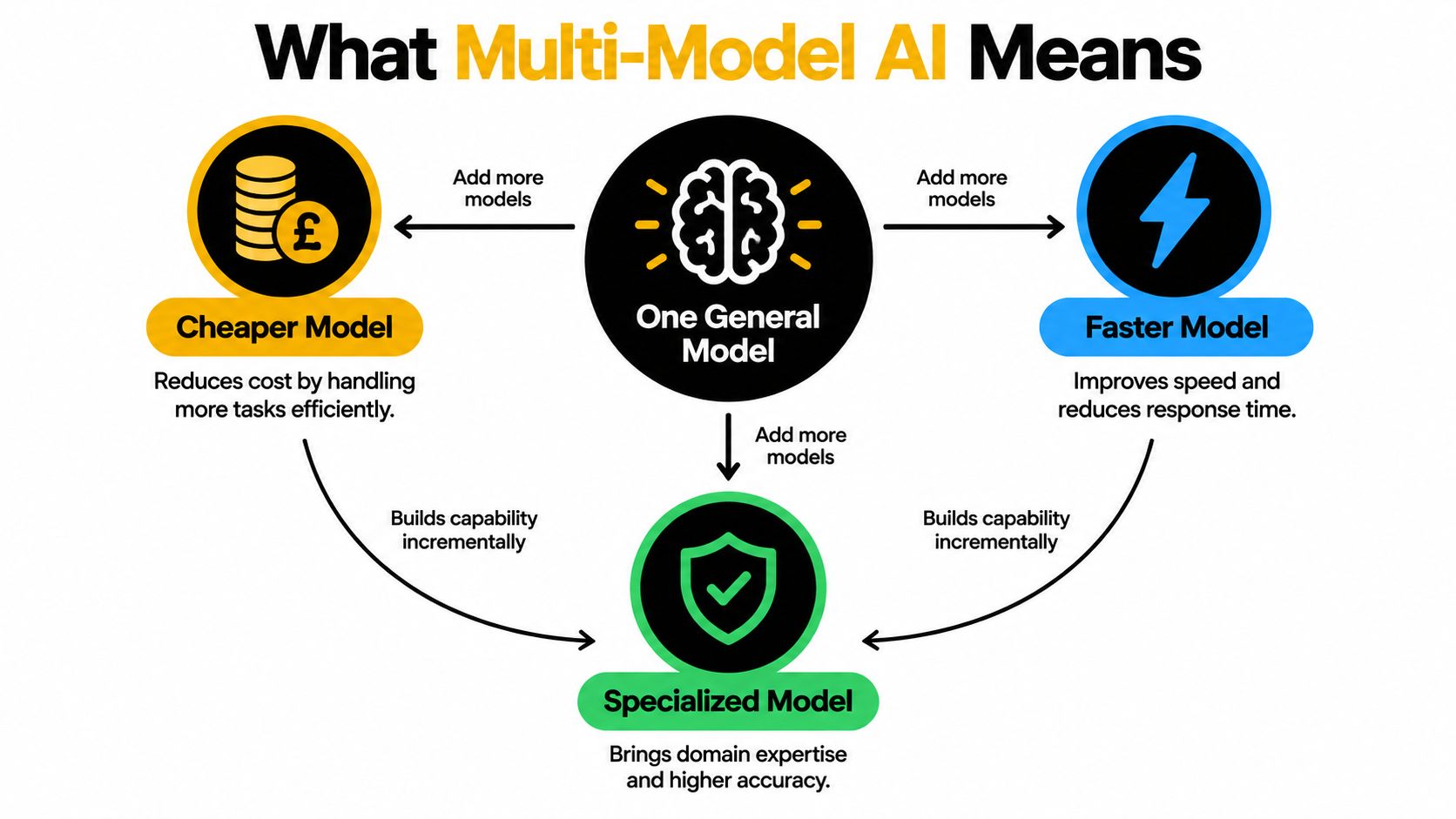
Start with a simple application: one general-purpose model receives every request and produces every answer. Multi-model AI changes that design by letting the application use different models for different jobs. Think of it as a workshop: a general-purpose tool remains useful, but a specialist tool is better when the task calls for it.
A practical portfolio might include a language model for complex reasoning, a less expensive model for routine classification, a vision-language model for image-heavy documents, and an embedding model to support retrieval. A team might also use a fine-tuned open-source model for a narrow domain. The point is not that every product needs all these components; it's that model choice can follow the work instead of being fixed at the application level.
Three distinctions prevent confusion
A portfolio of language models can still be single-modality. It may include several text models with different cost, latency, or capability profiles. A multi-model architecture can go further by combining model families, such as language, vision-language, and embedding models, as well as models with different licensing and operating characteristics.
Multi-model AI also doesn't automatically mean an agent system. The application may select a model and return its response. Nor does it have to mean that several models answer the same prompt and vote on the result. That latter design is an ensemble, which serves a different purpose and can add inference cost and coordination overhead.
The shift toward foundation models and multimodal systems helps explain why teams increasingly make model selection a workload-level engineering decision. Research tracking scientific publications found that foundation-model usage rose from 0.06% to 1.5% between the earlier observation period and 2024, while multimodal models reached an 8.4% share of foundation-model use (publication-trend study). Those publication figures describe research usage, not the performance a particular product should expect.
For an engineering team, the working definition is straightforward: a multi-model system assigns the model or model family that fits a workload, under explicit quality, cost, latency, and policy constraints. If the system can't explain why a request went to a particular model, it may have a model collection, but it doesn't yet have a useful routing strategy.
The Core Workloads That Justify Multiple Models
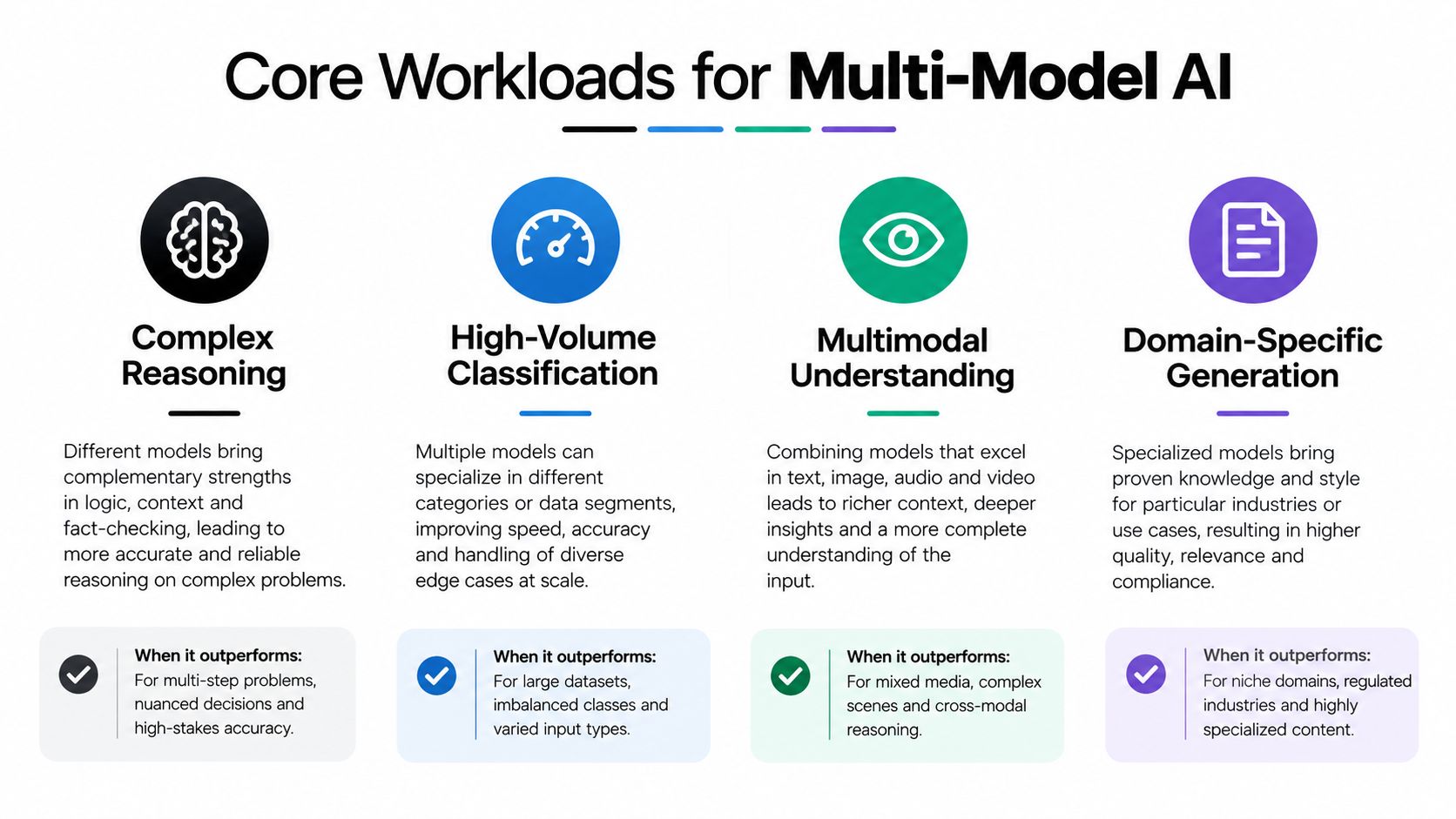
Model diversity is most useful when requests place meaningfully different demands on the system. A model that's economical for simple text classification may not be adequate for a complex analysis task. A language model that performs well on prose may not be the right component for visual document understanding.
| Workload | Likely fit | What to test |
|---|---|---|
| Complex reasoning | A stronger language model, with escalation for difficult cases | Task success, answer quality, and response time |
| High-volume classification | A smaller, faster language model where errors are recoverable | Accuracy by class and the cost of misclassification |
| Multimodal understanding | A vision-language model for images or document content | Extraction quality and behavior on difficult inputs |
| Retrieval | Embeddings for candidate discovery, followed by a language model when synthesis is needed | Retrieval relevance and the final answer's grounding |
Match the model to the expensive part of the work
For complex reasoning, a cheaper model may be useful for a first pass, but only if the system can detect when it hasn't produced an acceptable result. If a wrong answer triggers human review or a downstream workflow failure, apparent inference savings may vanish.
Classification often offers a cleaner opportunity. Requests may be short, repetitive, and easy to evaluate against labeled examples. A smaller model can be suitable when the team measures errors by category and routes ambiguous or high-impact cases for stronger review.
Vision and document tasks need their own evaluation. A model that sees images can handle input that text-only models can't, but that doesn't guarantee accurate extraction from every layout, scan, or chart. Retrieval is different again: an embedding model helps find relevant material, while answer generation may still require a language model. Treating those steps as one undifferentiated “AI call” makes it harder to locate the source of a bad result.
Cost comparisons also need the actual workload, not just a model's headline token price. Input volume, long context, repeated attempts, and reasoning behavior can change the economics. Teams comparing available options can use a catalog of AI models, then test candidates on representative requests rather than choosing from a generic ranking.
How Routing and Orchestration Actually Work
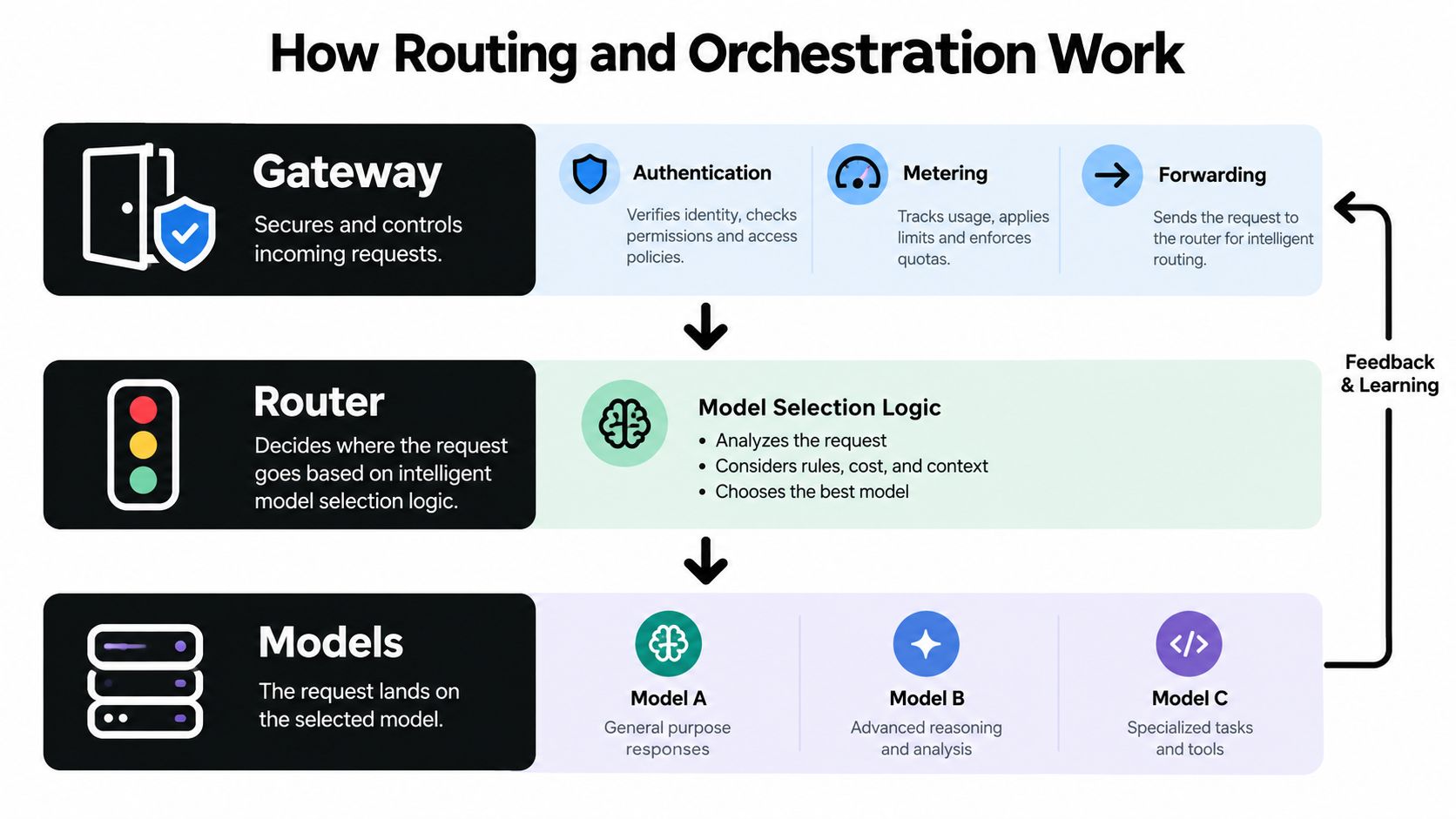
A production system usually has three distinct responsibilities. The gateway authenticates requests, applies access rules, meters usage, and forwards traffic. The router selects a model based on the request and the organization's policy. The orchestration layer coordinates retries, fallbacks, and any tool calls the workflow requires.
Make routing decisions legible
A router can use task class, prompt features, cost limits, latency targets, or the results of previous evaluations. A simple policy might send routine classification to a smaller model and reserve a stronger one for requests that meet a defined complexity or risk threshold. More advanced routing may score candidate models, but it still needs an explicit objective and a fallback when confidence is insufficient.
There's a difference between selecting a model for a whole task and switching models for individual requests. Task-level selection is easier to inspect and can be a sensible starting point. Request-level routing can adapt more precisely, but it depends on the router correctly recognizing the request and predicting which model will work.
Treat retries and streaming as product behavior
Streaming changes what users experience, so measure time to first token as well as total completion latency. Function calling and tool use need consistent handling across providers, including the way arguments and errors are represented. If a provider times out or returns a retryable error, orchestration needs to determine whether to retry, fail over, or surface an error without duplicating a side effect.
An OpenAI-compatible request shape can reduce integration differences when models come from different providers, but compatibility doesn't make their behavior identical. Teams still need to test response formats, streaming, tool calls, and error handling across their candidate models. Every request should leave a trace showing the input's task class, selected model and provider, latency, usage, and outcome.
A published MixLLM evaluation reported 97.25% of GPT-4-level response quality at 24.18% of the GPT-4 cost baseline (MixLLM evaluation). That result illustrates selective escalation, not a universal production guarantee. The right policy depends on the team's candidate models, request mix, and ability to recognize when a request needs stronger capability.
When Routing Helps and When It Quietly Costs You
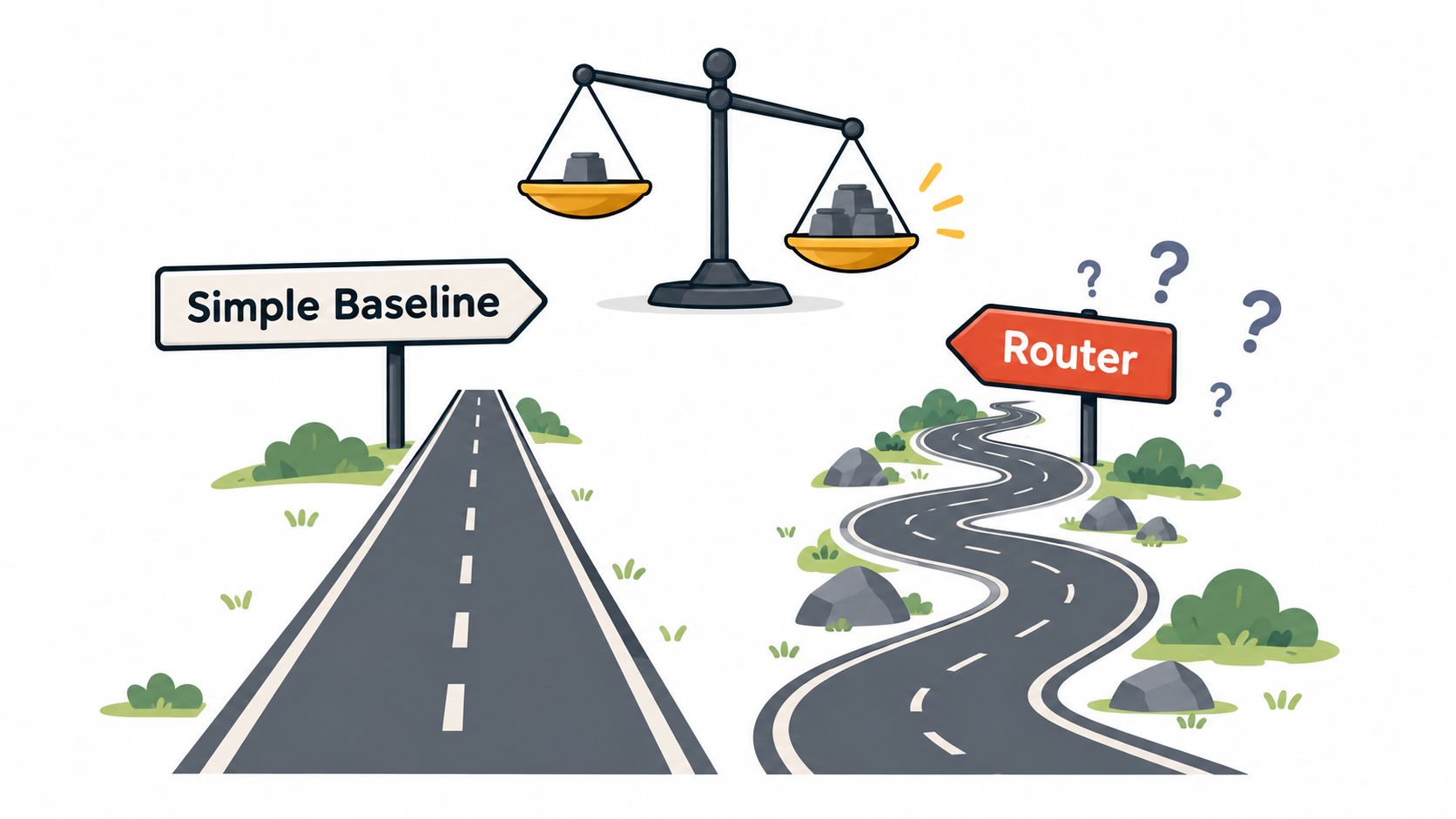
Routing can lower inference spend, but it can also make a system slower, less predictable, or harder to debug. The router adds its own decision process. A bad selection can lead to retries, human review, or a downstream failure that costs more than sending the original request to a stronger model.
A benchmark win can fail on your traffic
A router evaluated on one task distribution may perform poorly on another. Domain-specific language, multilingual inputs, long context, and tool use can all change which model is a good fit. A cheap model can also return a confident but incorrect answer, which is particularly costly when later steps treat that answer as reliable.
LLMRouterBench evaluated more than 400,000 instances across 21 datasets, 33 models, and nine routing methods, and found that many approaches, including commercial routers, didn't reliably beat simple baselines (LLMRouterBench discussion). The result is a reason to test routing against the actual workload, not a reason to conclude that routing can never help.
Before deployment, build a representative evaluation set and compare the router against clear baselines, such as always using the strongest acceptable model. Track task success, escalation accuracy, p95 latency, token cost, hallucination or error rates, and downstream workflow completion. A lower model bill isn't a win if it comes with more failed tasks or manual correction.
Shadow-evaluate new routing policies before letting them control live traffic. Compare their choices with the existing policy and inspect the cases where they disagree.
Set confidence thresholds and escalation rules for low-confidence or high-impact tasks. Refresh the evaluation set as traffic changes, and measure return on investment across completed workflows rather than isolated requests. The following video offers additional context on routing decisions:
A Unified Gateway Versus Direct Multi-Provider Integration
Teams can connect every provider directly or use a unified gateway between the application and its model providers. Direct integration offers control over each connection, but it makes the application responsible for provider-specific credentials, request handling, error behavior, and billing records. A gateway centralizes some of that work, though it also becomes an important dependency to evaluate.
| Concern | Direct multi-provider | Unified gateway |
|---|---|---|
| Integration | Maintain each provider's credentials and integration behavior | Use a shared interface where supported |
| Failover | Implement and test provider-specific recovery | May provide centralized retries and failover policies |
| Observability | Reconcile logs and usage across provider systems | Inspect usage in a shared per-call record |
| Billing | Track separate provider accounts and invoices | Consolidate usage and finance review |
| Control | Manage provider behavior directly | Assess gateway policies, availability, and data handling |
The operational benefit isn't fewer lines of code. It's having a consistent record of which model and provider handled each call, how long it took, how many tokens it used, and what it cost. Include time to first token and account for reasoning-token usage where the provider exposes it. Without per-call evidence, cost tuning and incident review become guesswork.
Decide what to consolidate
A gateway can reduce credential sprawl and integration duplication, but teams should still examine failover behavior, provider coverage, compatibility limits, and how request data is handled. Failover can protect against an upstream issue, but it may change latency or output behavior. Retrying a request is only safe when the application has considered whether the operation can be repeated without unintended effects.
Openbase provides an OpenAI-compatible gateway with access to models from multiple providers, a shared key and billing system, automatic failover, and per-call usage logging. Teams evaluating that approach can review the Openbase quickstart documentation to see how its request interface fits an existing integration.
For a small application with one provider and one narrow workload, direct integration may remain simpler. When a team has several providers and needs unified usage records, centralized failover, and consolidated billing, a gateway can reduce the operational burden. The decision should account for the gateway's own reliability and governance requirements, not just the convenience of a shared endpoint.
Choosing the Right Architecture for Your Team
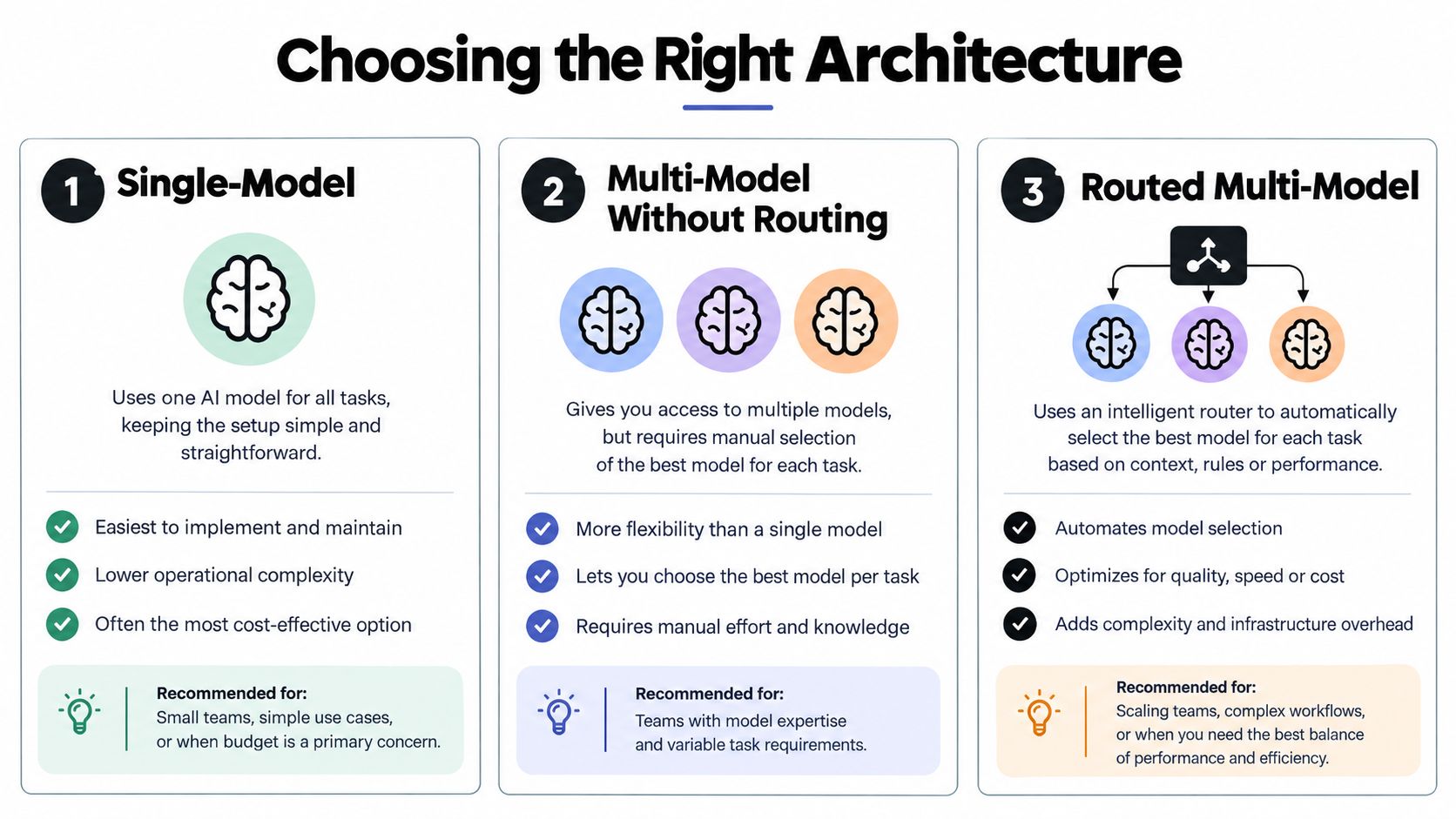
Architecture should follow workload diversity and operational needs, not a target number of models. A narrow product feature with predictable inputs can stay on one model if that model meets quality, cost, and latency requirements. Keeping the system simple is a real benefit, especially when the team lacks a clear way to evaluate alternatives.
A hand-picked portfolio without automatic routing is a reasonable next step when workloads differ but remain easy to classify in application logic. For example, the product might use one model family for document understanding and another for text generation. This keeps selection explicit while avoiding a router whose decisions the team can't yet measure.
Use routing when the evidence supports it
Routed multi-model systems make sense when workload variation, availability needs, or service targets justify automating model choice. They also require the team to define selection policies, measure their consequences, and maintain recovery behavior. If those foundations aren't in place, routing can add complexity without a dependable benefit.
Compliance can shape the choice as much as traffic. A growing portfolio needs clear ownership, request lineage, model-version control, and policies for which request types each model may serve. Regional handling and data retention requirements should be checked before adding another provider, not after a model has become embedded in a user-facing workflow.
A practical decision sequence is:
- Stay single-model when one model handles a narrow workload and the team can monitor its quality and availability.
- Build a small portfolio when distinct tasks need different capabilities, but selection can remain explicit.
- Add routing when measured workload differences justify automatic selection and the team can monitor both decisions and outcomes.
The next step isn't to adopt the most complex architecture. It's to identify the workload that strains the current design, evaluate a small set of alternatives on representative inputs, and choose the least complex system that meets the requirement.
Governing a Growing Model Portfolio
A model inventory should record the model and provider, version, region, retention terms, and approved request types. Per-request lineage then connects that inventory to what happened in production. When an incident, finance review, or compliance inquiry asks which model produced an output, the team should be able to answer from its own records.
Providers can change availability, pricing, safety behavior, and model versions independently. Version pinning, regional routing, access controls, and ongoing policy review help teams catch those changes before they alter production behavior. The portfolio needs an owner who can reconcile provider usage against internal telemetry, including retries and fallback calls.
For enterprise requirements, review Openbase's enterprise information alongside the organization's own security and compliance criteria.
Before expanding the portfolio, make these operational steps explicit:
- Define the routing decision and which requests each model may serve.
- Log per-request telemetry for model, provider, usage, latency, and outcome.
- Set cost guardrails and define what happens when they're reached.
- Pin model versions where the provider supports it, then review changes.
- Reconcile usage and invoices so retries and fallback calls aren't invisible.
Openbase provides unified access to models through an OpenAI-compatible API, with shared billing, automatic failover, and per-call usage logging. If you're assessing a gateway for a multi-model system, visit Openbase to review how it fits your integration and observability needs.